· guitar · 5 min read
Two New Free Guitar Tools: The Song Sheet Chord Detector and the 1-4-5 Chord Change Trainer
Paste a YouTube link and get the chords, bar by bar. Then build the speed to actually play them with the 1-4-5 Chord Change Trainer. Both are free and run right in your browser.
Two of the biggest hurdles for a newer guitar player are figuring out which chords a song uses and getting your hands to change between them in time. I built a free tool for each one. They live on the Guitar Tools page, and neither needs an account or an app.
The Song Sheet Chord Detector
The Song Sheet Chord Detector works the way a lot of the new AI chord apps do. Paste a YouTube link, press play, and the page listens along and writes out the chords as the song goes. Behind the scenes, Chrome lets the page hear the audio of its own tab. Nothing is downloaded or uploaded, and all the analysis happens on your computer.
As it listens, you get:
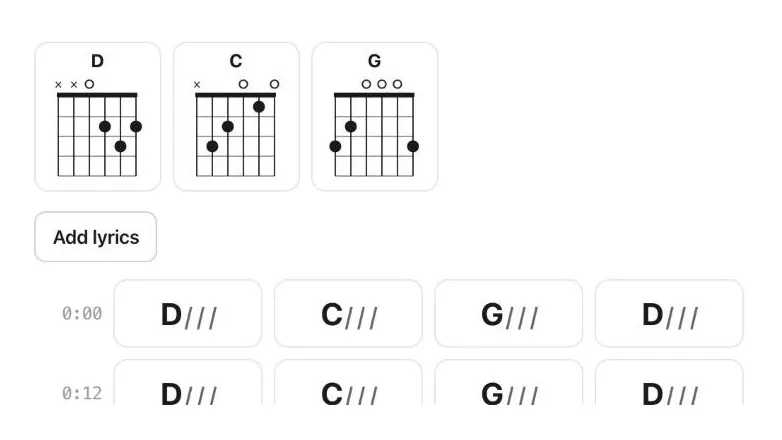
- The chords, bar by bar, in a simple “chord plus slashes” style (
D / / /is four beats of D) - The key, the tempo, and the easiest capo position, with diagrams for every chord shape you’ll need
- A Simplify setting. “Simpler” skips the quick passing chords and accent notes, so a song like Can’t You See comes out as plain D, C and G, the chords a new player would actually strum. “Simplest” keeps only the main chords.
- A chart that reads like sheet music. The tool spots the parts of the song that repeat, labels them (Intro, A, B…), and folds back-to-back repeats into “×2”, so the whole song fits on a page as a road map like Intro – A ×2 – B – A – B ×2. Print it and you get a proper rhythm chart: slashes on a staff with the chord names above, bar lines and repeat signs.
- Your own lyrics with the chords on top. Paste the words in (there’s a button that searches Google for them), tap the space bar as each line starts, and the chords land over the right words.
Play along with the video
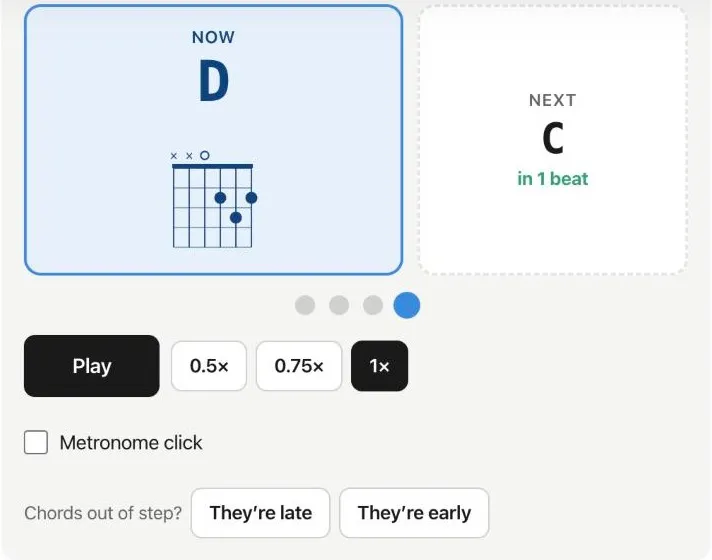 Play along mode: the chord to play now, the next chord with a beat countdown, and a dot for each beat of the bar.
Once the sheet is built, switch to Play along. The video replays with the current chord and its diagram, the next chord, and a countdown of beats until the change. You can slow the song to half or three-quarter speed, and there’s an optional metronome click that follows the song’s own beat, accented on the first beat of each bar. You can also print a clean song sheet, and every sheet is saved in your browser so you can come back to it.
Be honest with yourself about the chords
No chord detector is perfect, including the paid ones. This one does best on songs with clear guitar or piano. Busy mixes, big vocal harmonies and 7th chords can trip it up. Tap any chord to hear that spot and fix it, or use the Compare on Ultimate Guitar button to check it against the free community charts. Where it really shines is timing: knowing exactly when each change comes in the actual recording.
It needs Chrome or Edge on a computer to listen to a YouTube video. On other browsers you can still drop in an audio file.
The 1-4-5 Chord Change Trainer
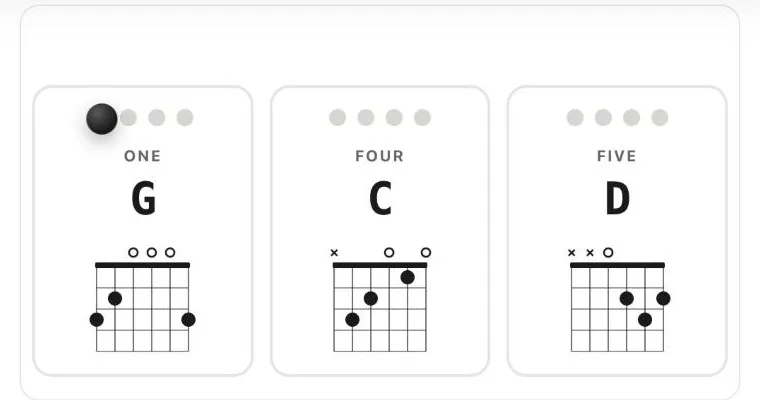 The ball bounces from beat to beat, so you’re always looking at the next chord instead of your fretting hand.
Knowing the chords is only half of it. Most beginners can play a G, a C and a D. The struggle is getting from one to the next without stopping. The 1-4-5 Chord Change Trainer is built for exactly that.
The one, four and five chords are the backbone of thousands of songs. Pick a key (C, G, D, A or E) and the trainer lays those three chords across the screen with their diagrams. A ball bounces from beat to beat, so you’re watching where you’re going next instead of staring down at your fretting hand.
A few things that make it a good daily drill:
- Start slow. It opens at 65 BPM. Step up 5 BPM at a time once the changes are clean, or let it speed up on its own every few rounds.
- Other progressions. Besides 1-4-5 there are 1-5-4-1, the ”50s” 1-6-4-5, and the pop 1-5-6-4.
- Options as you improve. Hold the five chord twice as long, play the five as a 7th, and choose a beep, click, wood block or drum kit for the count.
- Songs to play. Each key comes with a list of real songs that use those same three chords, filterable by decade and genre, so you can put the drill to work right away.
Need a song to start with? Try the Song of the Week
If you’re not sure what to learn next, check out the Song of the Week. Each week I pick one song I’m learning myself, and you can learn it right along with me. Every song comes with the chords, key and capo, the strumming pattern, a 7-day practice plan, lesson links, and the tool from the Guitar Tools page that will help most. A new song goes up every week, and the earlier ones stay in the archive, so there’s always something to work on.
How I’d use them together
Find a song you want to learn and run it through the Song Sheet Chord Detector, set to “Simpler”. Take the chord changes that trip you up to the Chord Change Trainer and drill them slowly until they’re clean. Then come back to Play along and play with the actual recording, at half speed first if you need it.
Both tools are free and on the Guitar Tools page. If you find a song the Song Sheet Chord Detector gets badly wrong, or have an idea for either tool, let me know.